
HTPIC18 Các chương trình cho PIC18

Collapse
This is a sticky topic.
X
X
 
  • Giờ
  • Show
Clear All
new posts
  • ngohaibac
    Đệ tử 9 túi
    • Oct 2005
    • 231

    #1

    HTPIC18 Các chương trình cho PIC18

    Chào các bạn. Mình mới thi xong nên upload vài code về HTPIC18 cho các bạn.

    Đầu tiên là thư viện LCD full cho 8 bit và 4 bit mode. Mình đã test thành công thư viện và chạy rất ok.

    Mình dùng PIC18F2620.

    Trình dịch : HTPIC18 V9.50

    Sơ đồ chân kết nối với LCD.
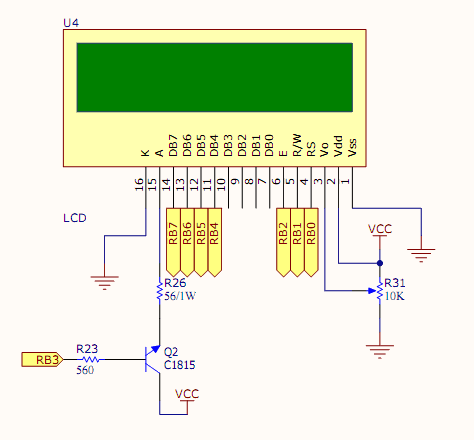

    Đầu tiên là hàm LCD.h
    Code:
    // LCD.h
    #ifndef	 LCD_H
    #define	LCD_H
    
    # include "pic18.h"
    
    // Defines
    # define 		TRUE 		1
    # define 		FALSE		0
    
    /*======================================================================================
    Define LCD_PORT
    ======================================================================================*/
    #define	LCD_DATA_PORT		PORTB					// Port on which LCD data lines are connected
    #define	LCD_TRIS_PORT		TRISB					// Need to specify the corresponding TRIS
    
    # define LCD_RS			RB0
    # define LCD_RW			RB1
    # define LCD_E				RB2
    
    # define	LCD_TRIS_RS		TRISB0
    # define LCD_TRIS_RW		TRISB1
    # define LCD_TRIS_E		TRISB2
    
    
    //============== Using LCD - 2 line, 16 colum
    #define	LCD_MODE_2x16		(TRUE)					// HDM16216H-2, HDM16216H-4, HDM16216H-5, HDM16216H-B, HDM16216H-D, HDM16216L-2, HDM16216L-5, HDM16216L-7, HDM16216L-D, HDM16216L-B, HDM16216H-I
    
    // Define for LCD_DISPLAY_CONTROL
    #define	LCD_DISPLAY_ON					(TRUE)					// Turn display on/off
    #define	LCD_CURSOR_BLINK					(FALSE)				// Blink/Noblink cursor mode
    #define	LCD_CURSOR_ON					(TRUE)					// Cursor visible
    // Define for LCD_ENTRY_MODE
    #define	LCD_CURSOR_INCREMENT			(TRUE)					// Set left-to-right cursor movement
    #define	LCD_CURSOR_SHIFT					(FALSE)				// Shift display on entry
    
    // Other user defines 
    #define	LCD_ALLOW_USER_CHARS			(TRUE)					// Controls whether display uses ASCII for control chars or uses user-defined chars in lcd_putc()
    #define	LCD_ENABLE_GETC					(TRUE)					// Save code space by setting to FALSE
    #define	LCD_ENABLE_GOTOXY				(TRUE)					//   any functions which you will not
    #define	LCD_ENABLE_PRINTF				(TRUE)					//   need in your application.
    #define	LCD_ENABLE_UNSCROLL			(TRUE)
    #define	LCD_ENABLE_SCROLL				(TRUE)
    #define	LCD_ENABLE_CLEAR					(TRUE)
    
    #if LCD_MODE_2x16
    	#define LCD_MAXROWS						((unsigned char)(2))
    	#define	LCD_MAXCOLS						((unsigned char)(16))
    	# define LCD_MULTI_LINE					(TRUE)
    #endif
    	
    // Define 4 Bit or 8Bit mode
    #define LCD_8_BIT_MODE						(FALSE)
    #define LCD_4_BIT_MODE						(!LCD_8_BIT_MODE)
    
    // Define LCD_TRIS_DATAMASK
    #if LCD_4_BIT_MODE
    	#define	LCD_TRIS_DATAMASK				(0b11110000)			// Define the bitmask used to read/write the data bits
    	#define	LCD_D4_BIT		4					// Attachment of D0 to data port bus - note
    #else
    	#define	LCD_TRIS_DATAMASK				(0b11111111)			// Define all bits used for 8-bit mode
    #endif
    
    // =======================  Define command code
    #define	LCD_COMMAND_CLEAR				((unsigned char)(0x01))	//1.53 ms	// Clear screen, home cursor, unshift display
    #define	LCD_COMMAND_HOME				((unsigned char)(0x02))	//1.53 ms	// Home cursor, unshift display
    #define	LCD_COMMAND_BACKSPACE		((unsigned char)(0x10))				// Move cursor left one (destructive based on LCD_DESTRUCTIVE_BS)
    #define	LCD_COMMAND_FWDSPACE		((unsigned char)(0x14))				// Move cursor right one
    #define	LCD_COMMAND_PANLEFT			((unsigned char)(0x18))				// Move screen left one
    #define	LCD_COMMAND_PANRIGHT			((unsigned char)(0x1C))			// Move screen right one
    
    
    // ==================== Declare some functions
    void	delay_us (unsigned char us);
    void 	delay_ms(unsigned char  ms);
    unsigned char LCD_getByte (void);
    void 	LCD_PrByte (unsigned char  c);
    void	LCD_Command(unsigned char c);
    void 	LCD_PrChar (unsigned char  c);
    void	LCD_gotoXY(unsigned char row, unsigned char col);
    unsigned char  LCD_getChar (void);						// Read character at cursor
    void 	LCD_Init(void);
    void 	LCD_PrString (const char* message); 
    
    #if (LCD_4_BIT_MODE)
    	void lcd_putnybble (unsigned char  c);
    # endif
    
    #endif
    LCD.c
    Code:
    //LCD.c
    # include "lcd.h"
    # include "pic18.h"
    
    // ==== Some constants for LCD 16x2
    const unsigned char  const LCD_ROW_ADDRESS[] =					// Row/Column information for LCD_gotoxy()
    	{
    	0x00,		// Line 1
    	0x40		// Line 2
    	};
    
    const unsigned char  const LCD_INIT_STRING [] =					// LCD Init String on powerup
    	{
    	0b00000001,							//	Clear display
    	0b00000010,							//	Home cursor
    	0b00000100							//	Entry Mode
    #if LCD_CURSOR_INCREMENT
    	| 0b00000010							//		Increment cursor
    #endif
    #if LCD_CURSOR_SHIFT
    	| 0b00000001							//		Shift on cursor
    #endif
    		,							//		end
    	0b00001000							//	Display Control
    #if LCD_DISPLAY_ON
    	| 0b00000100							//		Display on
    #endif
    #if LCD_CURSOR_ON
    	| 0b00000010							//		Cursor on
    #endif
    #if LCD_CURSOR_BLINK
    	| 0b00000001							//		Blink on
    #endif
    		,							//		end
    		
    	0b00100000							//	Function Set
    #if LCD_8_BIT_MODE
    	| 0b00010000							//		8-bit data bus
    #endif
    #if LCD_MULTI_LINE
    	| 0b00001000							//		2-line refreshing
    #endif
    #if LCD_DISPLAY_5x10
    	| 0b00000100							//		5x10 matrix
    #endif
    };
    
    const unsigned char  const LCD_ENTRY_MODE ={
    	0b00000100
    #if LCD_CURSOR_INCREMENT
    	| 0b00000010							//		Increment cursor
    #endif
    #if LCD_CURSOR_SHIFT
    	| 0b00000001							//		Shift on cursor
    #endif
    } ;
    
    const unsigned char  const LCD_FUNCTION_SET = {
    	0b00100000							//	Function Set
    #if LCD_8_BIT_MODE
    	| 0b00010000							//		8-bit data bus
    #endif
    #if LCD_MULTI_LINE
    	| 0b00001000							//		2-line refreshing
    #endif
    #if LCD_DISPLAY_5x10
    	| 0b00000100							//		5x10 matrix
    #endif
    };	
    
    const unsigned char  const LCD_DISPLAY_CONTROL = {	
    	0b00001000							//	Display Control
    #if LCD_DISPLAY_ON
    	| 0b00000100							//		Display on
    #endif
    #if LCD_CURSOR_ON
    	| 0b00000010							//		Cursor on
    #endif
    #if LCD_CURSOR_BLINK
    	| 0b00000001							//		Blink on
    #endif
    };	
    //==========================================================================================
    void delay_us (unsigned char us){
    	while(us--){
    		asm("nop");
    		asm("nop");
    	};
    }
    
    //==========================================================================================
    void delay_ms(unsigned char  ms){
    	unsigned char	i, j;
    	while(ms--){
    		for (i = 0; i < 20; i++)
    			for (j = 0; j < 100; j++)
    				asm("nop");
    		};
    }
    // ============================================================================================
    unsigned char LCD_getByte (void){
    	unsigned char retval; 									// Return value
    	
    #if (LCD_4_BIT_MODE)
    	unsigned char highbits ;
    	LCD_TRIS_PORT |= LCD_TRIS_DATAMASK;		 	// Set port to read mode for data pins
    	LCD_RW = 1;											// Tell LCD we want to read
    	delay_ms (1);
    	LCD_E = 1;
    	highbits = (((LCD_DATA_PORT & LCD_TRIS_DATAMASK) >> LCD_D4_BIT) << 4);// Grab high bits and shift to right place
    	LCD_E = 0;
    	delay_ms (1);
    	LCD_E = 1;
    	delay_ms (1);
    	retval = ((LCD_DATA_PORT & LCD_TRIS_DATAMASK) >> LCD_D4_BIT);	// Grab low bits
    	LCD_E = 0;
    	retval |= highbits;
    	LCD_TRIS_PORT &= ~LCD_TRIS_DATAMASK;				// Set port back to output mode
    # else
    	LCD_TRIS_PORT = 0xFF;								// Set port to all input
    	LCD_RW = 1;											// Tell LCD we want to read
    	delay_ms (2);
    	LCD_E = 1;												// Do the read
    	delay_ms (2);
    	retval = LCD_DATA_PORT;
    	LCD_E = 0;
    	LCD_TRIS_PORT = 0x00;								// Set port back to outputs
    # endif
    	return (retval);
    }
    //====================================================================================================
    void LCD_PrByte (unsigned char  c){						// Write byte to port in current RS mode
    	unsigned char RS_Status;
    	RS_Status = LCD_RS;	
    									// Get old pin state
    	LCD_RS = 0;											// Force into command mode to read state
    	while (LCD_getByte () & 0x80);							// Wait for read state
    	if (RS_Status)
    		LCD_RS = 1;										// Restore RS to old state
    		
    	delay_ms (1);
    	LCD_RW = 0;											// Set to write mode
    	delay_us (1);
    	
    #if LCD_4_BIT_MODE
    	lcd_putnybble (c >> 4);						// Send the character out
    	lcd_putnybble (c);
    #else
    	LCD_DATA_PORT = c;						// Send the character out
    	LCD_E = 1;
    	delay_us (1);
    	LCD_E = 0;	
    #endif
    	
    
    }
    //================================================================================================
    /*Ham yeu cau goi lenh dieu khien LCD*/
    void LCD_Command(unsigned char c){						// Send command to LCD port
    	LCD_RS = 0;
    	LCD_PrByte(c);	
    }
    //================================================================================================
    /*Ham yeu cau goi du lieu hien thi len LCD*/
    void LCD_PrChar (unsigned char  c){						// Write character to LCD
    	LCD_RS = 1 ;
    	LCD_PrByte(c);
    }
    //=================================================================================================
    void LCD_gotoXY(unsigned char Row, unsigned char Col){
    	if (Row > LCD_MAXROWS)						// Range limit
    		Row = LCD_MAXROWS;
    	if (Col > LCD_MAXCOLS)
    		Col = LCD_MAXCOLS;
    	
    	Row = LCD_ROW_ADDRESS[Row-1];					// Get address of first byte on desired row
    	Row += Col - 1;
    	LCD_Command (0x80 | Row);							// Write new cursor address
    }
    //  ===================================================================================== 
    unsigned char  LCD_getChar (void)							// Read character at cursor
    	{
    	unsigned char 	retval;										// Return value
    	LCD_RS = 1;
    	retval = LCD_getByte ();
    	LCD_RS = 0;
    	return (retval);
    	}
    
    //=======================================================================================
    void LCD_Init(void){
    	unsigned char i;	
    	 LCD_TRIS_PORT &= ~LCD_TRIS_DATAMASK;				// Set data bus to output 
    
    	 LCD_TRIS_E 		= 	0;
    	 LCD_TRIS_RW 	=	0;
    	 LCD_TRIS_RS 		=	0;
    
    	LCD_E = 0 ;
    	LCD_RS = 0;
    	LCD_RW = 0;
    	
    	delay_ms (15);							  //   Tao tre 15ms cho LCD khoi dong
    
    #if LCD_4_BIT_MODE							// Set LCD into 4-bit mode
    
    	lcd_putnybble(0b0010);
    	delay_ms(10);
    	lcd_putnybble(0b0010);
    	//delay_ms(10);	
    	
    	LCD_PrByte (LCD_FUNCTION_SET); 		//Function set  ; DL = 0(4 bits) , N = 1 (2 lines), F = 0 (5x8 dots)
           LCD_PrByte (LCD_DISPLAY_CONTROL);		// Display on/off control 
    	LCD_PrByte (LCD_ENTRY_MODE);		// Entry mode set
    
    	LCD_PrByte(LCD_COMMAND_CLEAR);
    	LCD_PrByte(LCD_COMMAND_HOME);
    
    #else
    
    	LCD_PrByte (LCD_FUNCTION_SET); 		//Function set  ; DL = 1(8 bits) , N = 1 (2 lines), F = 0 (5x8 dots)
    	LCD_PrByte (LCD_DISPLAY_CONTROL);		// Display on/off control 
    	LCD_PrByte (LCD_ENTRY_MODE);		// Entry mode set
    
    	LCD_PrByte(LCD_COMMAND_CLEAR);
    	delay_ms(2);
    	LCD_PrByte(LCD_COMMAND_HOME);
    	delay_ms(2);
    #endif
    }
    
    // ===================================================================================================  
    
    void LCD_PrString (const char* message){					// Write message to LCD (C string type)
    
    	while (*message)						//	Look for end of string
    		LCD_PrChar (*message++);					//	Show and bump
    }
    //================================================================================================
    #if LCD_4_BIT_MODE
    void lcd_putnybble (unsigned char  c)						// Write nybble to port in current RS mode
    	{
    	c = c << LCD_D4_BIT;					              	// Shift over to correct bit column
    	c &= LCD_TRIS_DATAMASK;						// Remove any extraneous bits
    	LCD_DATA_PORT = (LCD_DATA_PORT & ~LCD_TRIS_DATAMASK) | c;	// Write data bits to port
    	delay_us (1);
    	LCD_E = 1;							// Start to write it
    	delay_us (1);
    	LCD_E = 0;							// Finish write cycle
    	}
    #endif
    Chương trình chính để test:
    Code:
    /*;========================================================
    /*; Ten chuong trinh	: Test IO LCD
    ; Nguoi thuc hien	: Ngo Hai Bac (NOHB)
    ; Ngay thuc hien	: 23/06/07
    ; Phien ban			: 1.0		
    ; Mo ta phan cung	: Dung PIC18F2620s - thach anh 20MHz
    ; Trinh dich			: HTPIC 18V9.50				
    ;				
    ;----------------------------------------------------------------
    ; Ngay hoan thanh	: 
    ; Ngay kiem tra	: 
    ; Nguoi kiem tra	: 
    ;----------------------------------------------------------------
    ; Chu thich	: 		
    ;========================================================*/
    // Include
    # include "pic18.h"
    # include "LCD.h"
    
    
    // configuration
    __CONFIG(1,HS & FCMDIS & IESODIS);
    __CONFIG(2,BORV21 & PWRTDIS & WDTDIS);
    __CONFIG(3,MCLREN & LPT1DIS & PBANDIS);
    __CONFIG(4,DEBUGDIS & LVPDIS & STVRDIS & XINSTDIS);
    __CONFIG(5,UNPROTECT);
    __CONFIG(6,UNPROTECT);
    __CONFIG(7,UNPROTECT);
    
    /*=====================================================================================
      Main function
    =====================================================================================*/
    void main(){
    	unsigned char i;
    	
    	ADCON1 = 0x07;
    	TRISA = 0x00;
    	PORTA = 0xFF;
    	
    	TRISB = 0x00;
    	PORTB = 0xFF;
    
    	LCD_Init();
    	
    	LCD_gotoXY(2,3);
    	//LCD_PrChar('B');
    	//LCD_PrChar('B');
    	LCD_PrString("I Love You");
    
    	while(1);
    }
    Khi muốn thay đổi thuộc tính bạn chỉ cần thay đổi true, false trong file LCD.h là xong ngay.

    Anh em nào dùng thấy có ích thì thanks cho mình cái .

    Chúc các bạn thành công.
    Attached Files
    www.ngohaibac.net
    www.ngohaibac.com
  • ngohaibac
    Đệ tử 9 túi
    • Oct 2005
    • 231

    #2
    UART module and Auto Baud Rate Detect

    Chào các bạn.

    Đây là thư viện UART có chức năng tự detect Baud Rate. Khi muốn sử dụng chức năng này thì các bạn gọi hàm void UART_detectBaudRate(void);, khi đó trên PC phải truyền kí tự U để PIC đồng bộ tốc độ. Sau đó thì truyền nhận sẽ theo tốc độ đặt trên PC.

    Đây là hàm UART.h
    Code:
    // UART.h
    //=======================================================================================
    #ifndef _UART_H
    #define _UART_H
    //========================================================================================
    #include "pic18.h"
    // Define for UART
    #define TX			RC6
    #define RX 			RC7
    #define TRIS_TX	TRISC6
    #define TRIS_RX	TRISC7
    
    //========================================================================================
    // Declare sosme functions
    void UART_Init(unsigned int BaudRate);
    void UART_PrChar(unsigned char a);
    void UART_PrString(const char* str);
    unsigned char UART_Read(void);
    void UART_detectBaudRate(void);
    #endif
    UART.c
    Code:
    // UART.h
    # include "UART.h"
    # include "pic18.h"
    # include "sysdef.h"
    
    //========================================================================================
    // Initialize UART
    void UART_Init(unsigned int BaudRate){
    	unsigned int n;
    
    // Configure BaudRate
    	BRGH = 0; 				// Low speed.
    	BRG16 = 1;				// 16-Bit Baud Rate Generator - SPBRGH and SPBRG
    
    	// Baudrate = Fosc/[16(n+1)]  => n = ((Fosc/Baudrate)>>4) - 1;  n = SPBRGH: SPBRG;
    	n = ((Fosc/BaudRate)>>4) - 1;
    	SPBRG = n;
    	
    	SPBRGH = n>>8;
    	
    // Enable the asyncchronous serial port.
    	SYNC = 0 ;				// Asynchronous mode	
    	SPEN = 1;				// Serial port enable.
    	TRIS_TX = 0;
    	TRIS_RX = 1;
    
    //Configure for Transmitter mode.	
    	TXEN  = 1; 				// Transmit enable 
    
    //Configure for Receiver mode
    	CREN = 1;				// Enable the reception 
    
    	RCIF = 0;
    	RCIE = 1;				// Reception Interrupt Enable
    	GIE = 1;					// Global Interrupt Enable
    	PEIE = 1;				// Perapheral Interrupt Enable
    }	
    
    //=====================================================================================
    void UART_PrChar(unsigned char a){
    	while(!TRMT);
    	TXREG = a;
    }	
    //=====================================================================================
    void UART_PrString(const char* str){
    	while(*str)
    		UART_PrChar(*str ++);
    }	
    //=====================================================================================
    unsigned char UART_Read(void){
    	return (RCREG);
    }	
    //====================================================================================
    void UART_detectBaudRate(void){
    	TXSTA = 0b00100100;
    	RCSTA = 0b10010000;
    	BAUDCON = 0b00001001;
    	
    	while(ABDEN);
    }
    Chương trình test:
    Code:
    /*;========================================================
    /*; Ten chuong trinh	: Test IO
    ; Nguoi thuc hien	: Ngo Hai Bac (NOHB)
    ; Ngay thuc hien	: 27/06/07
    ; Phien ban			: 1.0		
    ; Mo ta phan cung	: Dung PIC18F2525/2620/4525/4620 - thach anh 20MHz
    ; Trinh dich			: HTPIC 18V9.50				
    ;				
    ;----------------------------------------------------------------
    ; Ngay hoan thanh	: 
    ; Ngay kiem tra	: 
    ; Nguoi kiem tra	: 
    ;----------------------------------------------------------------
    ; Chu thich	: 		
    ;========================================================*/
    // Include
    # include "pic18.h"
    # include "sysdef.h"
    # include "UART.h"
    
    // configuration
    __CONFIG(1,HS & FCMDIS & IESODIS);
    __CONFIG(2,BORV21 & PWRTDIS & WDTDIS);
    __CONFIG(3,MCLREN & LPT1DIS & PBANDIS);
    __CONFIG(4,DEBUGDIS & LVPDIS & STVRDIS & XINSTDIS);
    __CONFIG(5,UNPROTECT);
    __CONFIG(6,UNPROTECT);
    __CONFIG(7,UNPROTECT);
    
    // Receiver Interrupt Function
    void RxIntFcn(void);
    // Interrupt Function
    void interrupt MyInt  (void) {
    	if (RCIE && RCIF){
    		RCIF = 0;
    		RxIntFcn();	
    	};
    }
    /*=====================================================================================
      Main function
    =====================================================================================*/
    void main(){
    	unsigned char i;
    	
    	ADCON1 = 0x07;
    	TRISA = 0x00;
    	PORTA = 0xFF;
    	
    	TRISB = 0x00;
    	PORTB = 0xFF;
    	
    	UART_Init(9600);
    	UART_detectBaudRate();
    	while(1);
    }
    // Implementation of some functions
    void RxIntFcn(void){
    	unsigned char temp;
    	temp = UART_Read();
    	UART_PrChar(temp);
    }
    Chúc các bạn thành công.
    Attached Files
    www.ngohaibac.net
    www.ngohaibac.com

    Comment

    • congDT1
      Nhập môn đệ tử
      • Oct 2007
      • 4

      #3
      Ban co the upload Trình dịch : HTPIC18 V9.50 len cho minh nhe!minh cam on nhieu
      "congdt1k1@gmail.com"

      Comment

      • vohoc
        Nhập môn đệ tử
        • Jun 2006
        • 5

        #4
        Nguyên văn bởi congDT1 View Post
        Ban co the upload Trình dịch : HTPIC18 V9.50 len cho minh nhe!minh cam on nhieu
        "congdt1k1@gmail.com"
        lên đây mà down này, có file crack rồi đấy
        gái mú là phù du, cha mẹ là vĩnh cửu

        Comment

        • nampham
          Nhập môn đệ tử
          • Sep 2007
          • 2

          #5
          các cao thủ giúp em với, em thử giao tiếp chế độ 4 bit theo cách anh Bắc bảo nưng trên con 16f877a, nhưng mãi ko chạy. các cao thủ xin giúp em với:
          Code:
          #include<pic.h>
          __CONFIG(HS & PWRTEN & BOREN & LVPDIS & WDTDIS );
          
          /*======================================================================================
          Define LCD_PORT
          ======================================================================================*/
          #define		LCD_DATA_PORT		PORTB					// Port on which LCD data lines are connected
          #define		LCD_TRIS_PORT		TRISB					// Need to specify the corresponding TRIS
          
          #define 	LCD_RS				RB1
          #define 	LCD_RW				RB2
          #define 	LCD_E				RB0
          
          #define		LCD_TRIS_RS			TRISB1
          #define 	LCD_TRIS_RW			TRISB2
          #define 	LCD_TRIS_E			TRISB0
          
          #define		LCD_TRIS_DATAMASK	(0b11110000)			// Define the bitmask used to read/write the data bits
          #define		LCD_D4_BIT			4			
          
          #define LCD_FUNCTION_SET  		((unsigned char)(0b00101000))
          #define LCD_DISPLAY_CONTROL 	((unsigned char)(0b00001100))
          #define LCD_ENTRY_MODE	 		((unsigned char)(0b00000110))
          #define	LCD_COMMAND_CLEAR		((unsigned char)(0x01))	//1.53 ms	// Clear screen, home cursor, unshift display
          #define	LCD_COMMAND_HOME		((unsigned char)(0x02))	//1.53 ms	// Home cursor, unshift display
           
          // ==================== Declare some functions
          void	delay_us (unsigned char us);
          void 	delay_ms(unsigned char  ms);
          unsigned char LCD_getByte (void);
          void 	LCD_PrByte (unsigned char  c);
          //void	LCD_Command(unsigned char c);
          void 	LCD_PrChar (unsigned char  c);
          //void	LCD_gotoXY(unsigned char row, unsigned char col);
          //unsigned char  LCD_getChar (void);						// Read character at cursor
          void 	LCD_Init(void);
          void 	LCD_PrString (const char *message); 
          void 	lcd_putnybble (unsigned char  c);
          
          /*=====================================================================================
            Main function
          =====================================================================================*/
          void main()
          {
              TRISB = 0x00;
          	PORTB = 0xFF;
          
          	LCD_Init();
          	LCD_PrString("I Love You");
          	while(1);
          }
          //==========================================================================================
          void delay_us (unsigned char us){
          	while(us--){
          		asm("nop");
          		asm("nop");
          	};
          }
          
          //==========================================================================================
          void delay_ms(unsigned char  ms){
          	unsigned char	i, j;
          	while(ms--){
          		for (i = 0; i < 20; i++)
          			for (j = 0; j < 100; j++)
          				asm("nop");
          		};
          }
          //==========================================================================================
          void LCD_Init(void)
          {
          	
          	 LCD_TRIS_PORT &= ~LCD_TRIS_DATAMASK;				// Set data bus to output 
          
          	 LCD_TRIS_E 		= 	0;
          	 LCD_TRIS_RW 	    =	0;
          	 LCD_TRIS_RS 		=	0;
          
          	 LCD_E = 0 ;
          	 LCD_RS = 0;
          	 LCD_RW = 0;
          	 delay_ms (15);							  //   Tao tre 15ms cho LCD khoi dong
          
          	lcd_putnybble(0b0010);				    	// Set LCD into 4-bit mode
          	delay_ms(10);
          	lcd_putnybble(0b0010);
          	//delay_ms(10);	
          	
          	LCD_PrByte (LCD_FUNCTION_SET); 		//Function set  ; DL = 0(4 bits) , N = 1 (2 lines), F = 0 (5x8 dots)
              LCD_PrByte (LCD_DISPLAY_CONTROL);		// Display on/off control 
          	LCD_PrByte (LCD_ENTRY_MODE);		// Entry mode set
          
          	LCD_PrByte(LCD_COMMAND_CLEAR);
          	delay_ms (2);
          	LCD_PrByte(LCD_COMMAND_HOME);
          	delay_ms (2);
          }
          //====================================================================================================
          void LCD_PrByte (unsigned char  c)
          {						
          	unsigned char RS_Status;			// Write byte to port in current RS mode
          	RS_Status = LCD_RS;					// Get old pin state
          	LCD_RS = 0;							// Force into command mode to read state
          	while (LCD_getByte () & 0x80);		// Wait for read state
          	if (RS_Status)
          		LCD_RS = 1;						// Restore RS to old state		
          	delay_us (1);
          	LCD_RW = 0;							// Set to write mode
          	delay_us (1);
          	
          	lcd_putnybble (c >> 4);				// Send the character out
          	lcd_putnybble (c);
          }
          //================================================================================================
          unsigned char LCD_getByte (void)
          {
          	unsigned char retval; 									// Return value
          	unsigned char highbits ;
          	LCD_TRIS_PORT = LCD_TRIS_DATAMASK;		 	// Set port to read mode for data pins
          	LCD_RW = 1;											// Tell LCD we want to read
          	delay_ms (1);
          	LCD_E = 1;
          	highbits = (((LCD_DATA_PORT & LCD_TRIS_DATAMASK) >> LCD_D4_BIT) << 4);// Grab high bits and shift to right place
          	LCD_E = 0;
          	delay_ms (1);
          	LCD_E = 1;
          	delay_ms (1);
          	retval = ((LCD_DATA_PORT & LCD_TRIS_DATAMASK) >> LCD_D4_BIT);	// Grab low bits
          	LCD_E = 0;
          	retval |= highbits;
          	LCD_TRIS_PORT =0x00;//&= ~LCD_TRIS_DATAMASK;				// Set port back to output mode
          	return (retval);
          }
          //====================================================================================================
          void lcd_putnybble (unsigned char  c)						// Write nybble to port in current RS mode
          	{
          	c = c << LCD_D4_BIT;					              	// Shift over to correct bit column
          	c &= LCD_TRIS_DATAMASK;						// Remove any extraneous bits
          	LCD_DATA_PORT = (LCD_DATA_PORT & ~LCD_TRIS_DATAMASK) | c;	// Write data bits to port
          	delay_us (1);
          	LCD_E = 1;							// Start to write it
          	delay_us (1);
          	LCD_E = 0;							// Finish write cycle
          	}
          //============================================================================
          void LCD_PrString (const char *message){					// Write message to LCD (C string type)
          
          	while (*message)						//	Look for end of string
          		LCD_PrChar (*message++);					//	Show and bump
          }
          //============================================================================
          /*Ham yeu cau goi du lieu hien thi len LCD*/
          void LCD_PrChar (unsigned char  c){						// Write character to LCD
          	LCD_RS = 1 ;
          	LCD_PrByte(c);
          }
          //============================================================================
          Last edited by namqn; 03-04-2009, 04:13 AM. Lý do: định dạng code

          Comment

          • const_nos
            Đệ tử 2 túi
            • Jul 2008
            • 33

            #6
            Chào bác Bac. tôi mới tập dùng C18 để lập trình. trong đó có đoạn khai báo : #pragma
            tôi cungcos tham khảo tài liệu về cái này nhưng chưa được rõ cho lám. Vậy bac có thể giải thích thêm về khai báo này được ko?
            Cám ơn bác trước

            Comment

            • namqn
              Trưởng lão PIC bang
              • Feb 2006
              • 3020

              #7
              Nguyên văn bởi const_nos View Post
              Chào bác Bac. tôi mới tập dùng C18 để lập trình. trong đó có đoạn khai báo : #pragma
              tôi cungcos tham khảo tài liệu về cái này nhưng chưa được rõ cho lám. Vậy bac có thể giải thích thêm về khai báo này được ko?
              Cám ơn bác trước
              Mời bạn đọc luồng sau:


              Thân,
              Biển học mênh mông, sức người có hạn.

              Đang gặp vấn đề cần được giúp đỡ? Hãy dành ra vài phút đọc luồng sau:
              http://www.picvietnam.com/forum/showthread.php?t=1263

              Comment

              • hongquang9
                Nhập môn đệ tử
                • Mar 2011
                • 5

                #8
                cac pro cho em hoi la tai sao em tao duoc file cof bằng mplab ide ma ko tao duoc file

                Comment

                • hongquang9
                  Nhập môn đệ tử
                  • Mar 2011
                  • 5

                  #9
                  các pro cho em hỏi là tại sao em tạo được file cof bang mplab ide ma không tạo được file hex,em đang tạo file hex cho pic 18f452

                  Comment

                  • hongquang9
                    Nhập môn đệ tử
                    • Mar 2011
                    • 5

                    #10
                    cac pro oi cho em hoi la em thieu mat ham pic18.h,bac nao co thi up len cho em voi ah

                    Comment

                    • hongquang9
                      Nhập môn đệ tử
                      • Mar 2011
                      • 5

                      #11
                      Debug build of project `C:\Documents and Settings\Quang\My Documents\pic\bai6.mcp' started.
                      Language tool versions: mcc18.exe v3.37.01
                      Preprocessor symbol `__DEBUG' is defined.
                      Tue Apr 19 19:54:40 2011
                      ----------------------------------------------------------------------
                      Clean: Deleting intermediary and output files.
                      Clean: Deleted file "C:\Documents and Settings\Quang\My Documents\pic\dkdongco.o".
                      Clean: Deleted file "C:\Documents and Settings\Quang\My Documents\pic\bai6.cof".
                      Clean Warning: File "C:\Documents and Settings\Quang\My Documents\pic\bai6.hex" doesn't exist.
                      Clean: Done.
                      Executing: "C:\Program Files\Microchip\mplabc18\v3.37.01\bin\mcc18.exe" -p=18F452 /i"C:\MCC18\h" "C:\Documents and Settings\Quang\My Documents\dkdongco.c" -fo="dkdongco.o" -D__DEBUG -Ou- -Ot- -Ob- -Op- -Or- -Od- -Opa-
                      Executing: "C:\MCC18\bin\_mplink.exe" /l"C:\MCC18\lib" "..\..\..\..\MCC18\lkr\18f452.lkr" "dkdongco.o" "C:\MCC18\lib\p18f452.lib" /z__MPLAB_BUILD=1 /z__MPLAB_DEBUG=1 /o"bai6.cof" /M"bai6.map" /W
                      MPLINK 4.12, Linker
                      Copyright (c) 2007 Microchip Technology Inc.
                      Errors : 0

                      Loaded C:\Documents and Settings\Quang\My Documents\pic\bai6.cof.
                      ----------------------------------------------------------------------
                      Debug build of project `C:\Documents and Settings\Quang\My Documents\pic\bai6.mcp' succeeded.
                      Language tool versions: mcc18.exe v3.37.01
                      Preprocessor symbol `__DEBUG' is defined.
                      Tue Apr 19 19:54:40 2011
                      ----------------------------------------------------------------------
                      BUILD SUCCEEDED

                      build cuoi cung no ra the nay!cac pro giup em voi

                      Comment

                      • shindo216
                        Nhập môn đệ tử
                        • May 2010
                        • 9

                        #12
                        anh có thể cho crack của hitech 18 ko ?

                        Comment

                        • delta21
                          Đệ tử 5 túi
                          • Mar 2010
                          • 95

                          #13
                          nếu em muốn dùng dao động nội của pic8f4431 thì phải config thế nào vậy??
                          Chỉ sợ thiếu tiền......

                          Comment

                          • shindo216
                            Nhập môn đệ tử
                            • May 2010
                            • 9

                            #14
                            Nguyên văn bởi delta21 View Post
                            nếu em muốn dùng dao động nội của pic8f4431 thì phải config thế nào vậy??
                            bạn thử thay thế HS hoac XT bằng INTIO1 hoặc INTIO2 (tham khảo thêm datasheet để biết thêm chi tiết

                            Comment

                            • delta21
                              Đệ tử 5 túi
                              • Mar 2010
                              • 95

                              #15
                              Nguyên văn bởi shindo216 View Post
                              bạn thử thay thế HS hoac XT bằng INTIO1 hoặc INTIO2 (tham khảo thêm datasheet để biết thêm chi tiết
                              minh thay tất cả rồi ,báo lỗi cả ( trừ thay bằng RCIO thì ko báo lỗi)
                              Chỉ sợ thiếu tiền......

                              Comment

                              Working...